Course
Give your AI a permanent memory of your business. A course for people who use ChatGPT or Claude daily.Compound Context

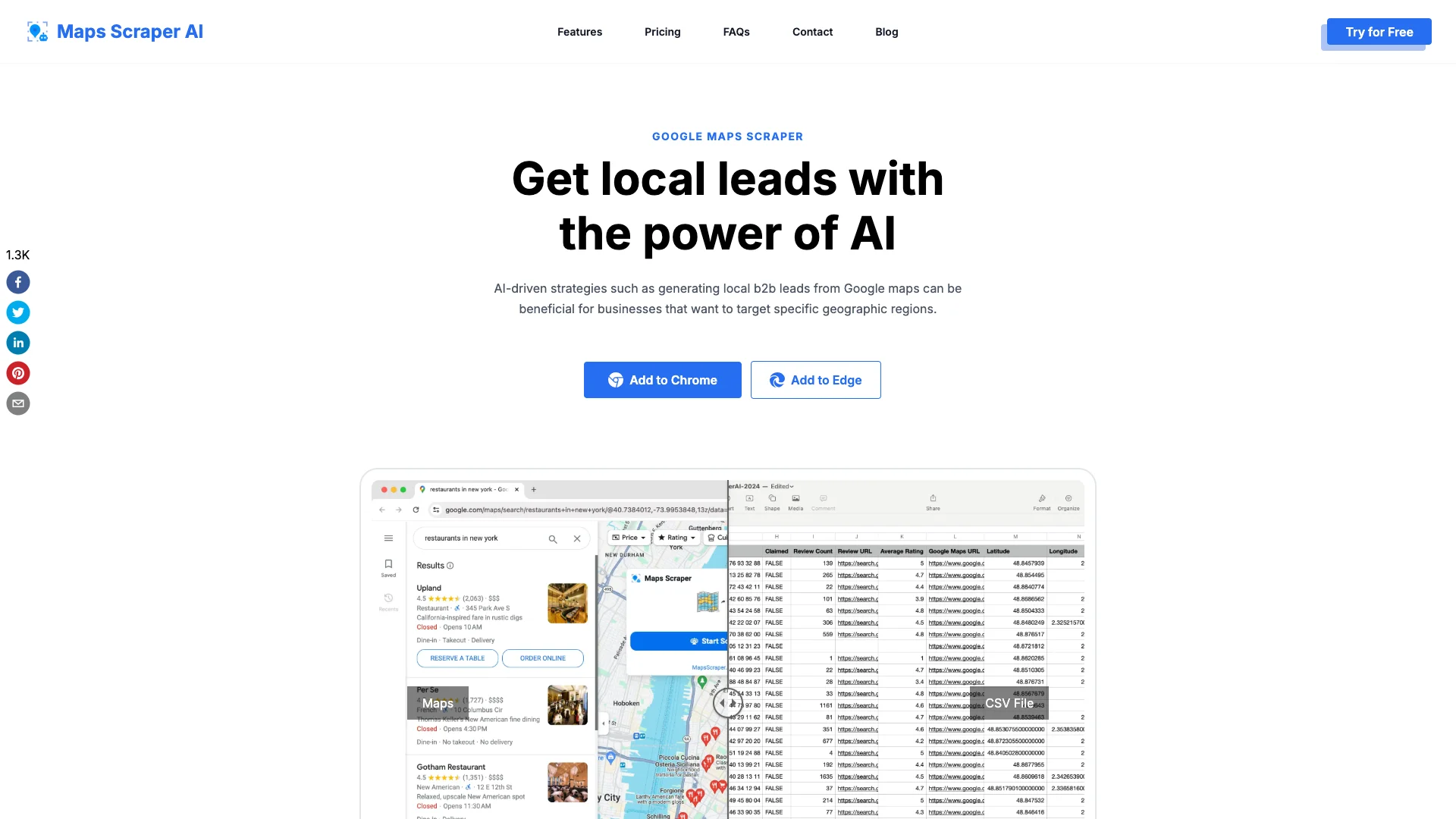
Maps Scraper AI is a smart tool that collects public business information from Google Maps. It helps businesses find new customers, study competitors, and get contact details like emails and phone numbers. This easy-to-use browser extension gathers data and puts it into a simple file like CSV or Excel, no coding needed.

Free Option

About Maps Scraper AI

Who It's For

Maps Scraper AI is for businesses and sales teams seeking local customer leads. It's ideal for anyone who needs to research competitors, create business directories, or gather contact information without needing to write any code.

What You Get

You receive detailed business information like names, addresses, phone numbers, and hidden email addresses. It also provides website links, social media profiles, customer reviews, and ratings. All extracted data is easily downloaded into CSV or Excel files for your use.

How It Works

To use it, install the Maps Scraper AI browser extension. Simply search on Google Maps as usual, then open the extension. The tool will automatically browse the results, acting like a real user to collect all visible details and find extra contact information before exporting everything into a spreadsheet.
Stay in the loop

Weekly roundup of new AI agents. No spam, unsubscribe anytime.

Subscribe and get the free 2026 AI Agents Field Guide

Join 1,500+ AI builders · weekly, no spam

Features & Capabilities

⚙️ Core Data Extraction

Email & Social Media Extraction

Uniquely extracts email addresses and social media profiles not typically displayed on Google Maps.

No-Code Operation

Allows data extraction from Google Maps effortlessly without requiring any coding skills.

Batch Search Capability

Enables users to search for multiple keywords simultaneously, streamlining the data collection process.

Comprehensive Data Fields

Extracts a wide range of business information, including contact details, location, reviews, and various identifiers.

🚀 Performance & Reliability

Lightning-Fast Results

Delivers instant and accurate insights, saving significant time compared to building custom scraping tools.

Human-like Browsing

Mimics real user behavior within Chrome to reduce the likelihood of being blocked by Google Maps.

Continuous Software Updates

Guarantees seamless and uninterrupted operation through timely updates adapting to Google Maps changes.

📊 Output & Lead Generation

CSV/XLS Export

Supports exporting extracted data into CSV or XLS files, including emails and phone numbers, with no limits.

Local B2B Lead Generation

Facilitates the generation of targeted local B2B leads by extracting business contact details from specific geographic regions.

Use Cases

Automating Local B2B Lead Generation

Businesses struggle to efficiently identify and gather comprehensive contact information for potential local clients. Maps Scraper AI empowers sales and marketing teams to quickly extract verified emails, phone numbers, and social media links from Google Maps, enabling highly targeted outreach campaigns and accelerating the lead generation process.

B2B Sales, MarketingFor: Sales Development Representatives, Marketing Managers, Business Development

Comprehensive Local Market and Competitor Analysis

Gaining insights into local market trends and competitor strategies requires extensive, up-to-date data. This tool allows researchers and strategists to efficiently extract detailed information like business categories, customer reviews, ratings, and pricing from specific geographic areas, supporting data-driven strategic planning and competitive intelligence.

Market Research, Business ConsultingFor: Market Researchers, Business Analysts, Strategists

Building Custom Local Business Directories

Creating and maintaining accurate, large-scale local business directories or specialized databases is a labor-intensive process. Maps Scraper AI automates the collection of vast amounts of structured business data, including names, addresses, phone numbers, and categories, enabling efficient compilation of current local listings for various applications.

Data Providers, Web DevelopmentFor: Data Analysts, Web Developers, Entrepreneurs

Enhancing Targeted Outreach and Networking

Identifying specific contact details for local businesses for partnership, sourcing, or community engagement can be challenging and time-consuming. The AI agent streamlines this by extracting direct emails, phone numbers, and social media profiles from Google Maps and associated websites, significantly reducing manual research for effective outreach and networking.

Business Development, RecruitingFor: Business Development Managers, Recruiters, Entrepreneurs

Frequently asked questions

Maps Scraper AI is an AI-powered automation tool (often a Chrome extension or web application) that extracts publicly available business data from Google Maps. It can gather names, addresses, phone numbers, websites, email addresses, social media links, and more, then export the data into CSV or Excel files.

You perform a search on Google Maps (e.g., "restaurants in Miami"), and the tool automatically browses the search results, acting like a real user. It collects visible business details and visits each business’s website to find additional contact information (like emails). All data is compiled, cleaned, and exported in a structured format (CSV/Excel).

Maps Scraper AI can extract business name, address, phone number, website URL, email address, social media links, ratings and reviews, Google Maps URL, and coordinates.

Yes, Maps Scraper AI is typically available as a Chrome browser extension, making it easy to install and use on Windows, macOS, and Linux.

Currently, Maps Scraper AI is designed for Google Maps. Custom scrapers for other map sources (like Bing Maps) may be available upon request.

To use Maps Scraper AI, you first install the extension and pin it to your toolbar. Then, open Google Maps and perform your desired search. Click the Maps Scraper AI icon in your browser to start the scraping process, and finally, download the extracted data as a CSV or Excel file.

Yes, Maps Scraper AI is designed to be user-friendly, often requiring no coding skills. It offers a point-and-click interface for easy data extraction.

For best results, search smaller areas (like cities or ZIP codes) rather than entire states. For example, search "Los Angeles restaurants" instead of "California restaurants."

Maps Scraper AI extracts only publicly available data and is designed to minimize the risk of being blocked by Google Maps. However, always review Google’s terms of service and use the tool responsibly.

The main use cases for Maps Scraper AI include lead generation for sales and marketing, market research and competitor analysis, building local business directories, and finding contact information for outreach.

Some versions offer a free trial or limited free usage, but full features may require a paid subscription.

Yes, Maps Scraper AI can extract business reviews and ratings from Google Maps, allowing for deeper market insights.

Maps Scraper AI uses AI to adapt to website changes, handle JavaScript content, and understand context, reducing maintenance and improving accuracy compared to traditional CSS selector-based scrapers.

Maps Scraper AI is available as a Chrome extension from the Chrome Web Store and as a web application from its official website.

If you don't get all the results for a large region, you should break down your search into smaller geographic areas (e.g., cities or ZIP codes) for more complete and accurate results.

Tags

Specifications

Deployment
Browser
Target Audience
Individual
Startup
Business
Complexity
No-code

Pricing

Free

Per monthly

Free
  • Monthly leads export 1,000
  • Export 15 records at a time
  • Custom export settings
  • Extract basic information
  • Extract phone numbers
  • Extract Website、Cid and Place Id

Pro

Per monthly

$19.9
  • Includes all features from the Free plan

✓ Free trial • ✓ Free plan • ✓ Plans from $19.9 / monthly

Integrations

Chrome
Edge

Want your AI tool listed here?

Start with a free eligibility check.

Submit