

Rootly MCP Server




An MCP server for the Rootly API for Cursor, Windsurf, Claude, and other MCP clients.
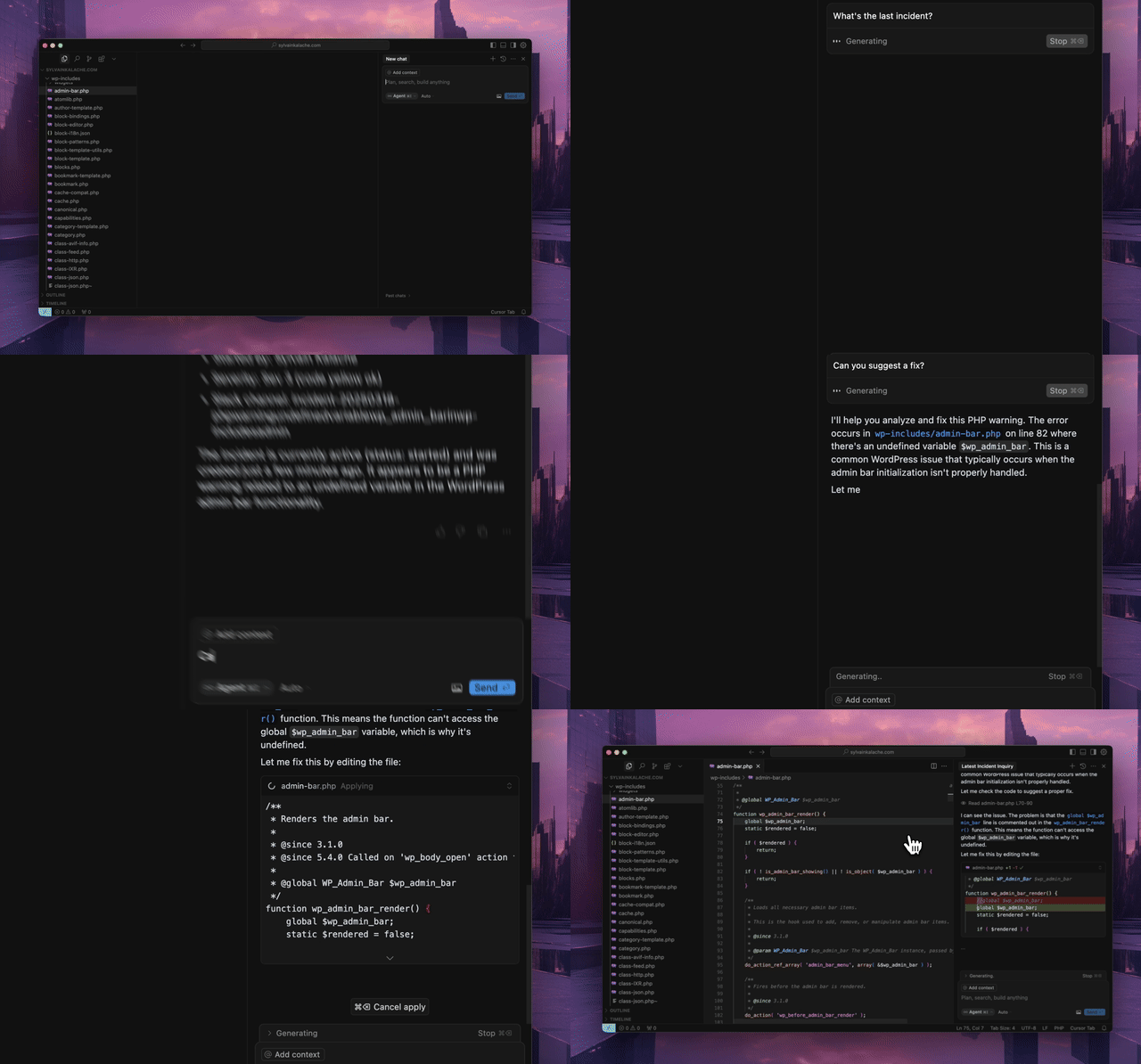
Quick Start
Use the hosted MCP server. No local installation required.
Hosted Transport Options
- Streamable HTTP (recommended):
https://mcp.rootly.com/mcp - SSE (fallback):
https://mcp.rootly.com/sse - Code Mode:
https://mcp.rootly.com/mcp-codemode
General Remote Setup
Default remote config (HTTP streamable):
{
  "mcpServers": {
    "rootly": {
      "url": "https://mcp.rootly.com/mcp",
      "headers": {
        "Authorization": "Bearer YOUR_ROOTLY_API_TOKEN"
      }
    }
  }
}
SSE fallback:
{
  "mcpServers": {
    "rootly": {
      "url": "https://mcp.rootly.com/sse",
      "headers": {
        "Authorization": "Bearer YOUR_ROOTLY_API_TOKEN"
      }
    }
  }
}
Code Mode:
{
  "mcpServers": {
    "rootly": {
      "url": "https://mcp.rootly.com/mcp-codemode",
      "headers": {
        "Authorization": "Bearer YOUR_ROOTLY_API_TOKEN"
      }
    }
  }
}
Agent Setup
<details> <summary><strong>Claude Code</strong></summary> <br>Streamable HTTP
claude mcp add --transport http rootly https://mcp.rootly.com/mcp \
  --header "Authorization: Bearer YOUR_ROOTLY_API_TOKEN"
Code Mode:
claude mcp add rootly-codemode --transport http https://mcp.rootly.com/mcp-codemode \
  --header "Authorization: Bearer YOUR_ROOTLY_API_TOKEN"
SSE fallback:
claude mcp add --transport sse rootly-sse https://mcp.rootly.com/sse \
  --header "Authorization: Bearer YOUR_ROOTLY_API_TOKEN"
Manual Configuration
Create .mcp.json in your project root:
{
  "mcpServers": {
    "rootly": {
      "type": "sse",
      "url": "https://mcp.rootly.com/sse",
      "headers": {
        "Authorization": "Bearer YOUR_ROOTLY_API_TOKEN"
      }
    }
  }
}
Restart Claude Code after updating the config.
</details> <details> <summary><strong>Gemini CLI</strong></summary> <br>Install the extension:
gemini extensions install https://github.com/Rootly-AI-Labs/Rootly-MCP-server
Or configure manually in ~/.gemini/settings.json:
{
  "mcpServers": {
    "rootly": {
      "command": "uvx",
      "args": ["--from", "rootly-mcp-server", "rootly-mcp-server"],
      "env": {
        "ROOTLY_API_TOKEN": "<YOUR_ROOTLY_API_TOKEN>"
      }
    }
  }
}
Add to .cursor/mcp.json or ~/.cursor/mcp.json:
{
  "mcpServers": {
    "rootly": {
      "url": "https://mcp.rootly.com/mcp",
      "headers": {
        "Authorization": "Bearer <YOUR_ROOTLY_API_TOKEN>"
      }
    }
  }
}
Add to ~/.codeium/windsurf/mcp_config.json:
{
  "mcpServers": {
    "rootly": {
      "serverUrl": "https://mcp.rootly.com/mcp",
      "headers": {
        "Authorization": "Bearer <YOUR_ROOTLY_API_TOKEN>"
      }
    }
  }
}
Add to ~/.codex/config.toml:
[mcp_servers.rootly]
url = "https://mcp.rootly.com/mcp"
bearer_token_env_var = "ROOTLY_API_TOKEN"
Add to claude_desktop_config.json:
{
  "mcpServers": {
    "rootly": {
      "command": "npx",
      "args": [
        "-y",
        "mcp-remote",
        "https://mcp.rootly.com/mcp",
        "--header",
        "Authorization: Bearer <YOUR_ROOTLY_API_TOKEN>"
      ]
    }
  }
}
Rootly CLI
Standalone CLI for incidents, alerts, services, and on-call operations.
Install via Homebrew:
brew install rootlyhq/tap/rootly-cli
Or via Go:
go install github.com/rootlyhq/rootly-cli/cmd/rootly@latest
For more details, see the Rootly CLI repository.
Alternative Installation (Local)
Run the MCP server locally if you do not want to use the hosted service.
Prerequisites
- Python 3.12 or higher
uvpackage managercurl -LsSf https://astral.sh/uv/install.sh | sh- Rootly API token
API Token Types
Choose the token type based on the access you need:
- Global API Key: Full access across the Rootly instance. Best for organization-wide visibility.
- Team API Key: Access limited to entities owned by that team.
- Personal API Key: Access matches the user who created it.
A Global API Key is recommended for tools like get_oncall_handoff_summary, get_oncall_shift_metrics, and org-wide incident search.
With uv
{
  "mcpServers": {
    "rootly": {
      "command": "uv",
      "args": [
        "tool",
        "run",
        "--from",
        "rootly-mcp-server",
        "rootly-mcp-server"
      ],
      "env": {
        "ROOTLY_API_TOKEN": "<YOUR_ROOTLY_API_TOKEN>"
      }
    }
  }
}
Self-Hosted Transport Options
Choose one transport per server process:
- Streamable HTTP endpoint path:
/mcp - SSE endpoint path:
/sse - Code Mode (experimental) endpoint path:
/mcp-codemodein hosted dual-transport mode
Example Docker run (Streamable HTTP):
docker run -p 8000:8000 \
  -e ROOTLY_TRANSPORT=streamable-http \
  -e ROOTLY_API_TOKEN=<YOUR_ROOTLY_API_TOKEN> \
  rootly-mcp-server
Example Docker run (SSE):
docker run -p 8000:8000 \
  -e ROOTLY_TRANSPORT=sse \
  -e ROOTLY_API_TOKEN=<YOUR_ROOTLY_API_TOKEN> \
  rootly-mcp-server
Example Docker run (Dual transport + Code Mode):
docker run -p 8000:8000 \
  -e ROOTLY_TRANSPORT=both \
  -e ROOTLY_API_TOKEN=<YOUR_ROOTLY_API_TOKEN> \
  rootly-mcp-server
With uvx
{
  "mcpServers": {
    "rootly": {
      "command": "uvx",
      "args": [
        "--from",
        "rootly-mcp-server",
        "rootly-mcp-server"
      ],
      "env": {
        "ROOTLY_API_TOKEN": "<YOUR_ROOTLY_API_TOKEN>"
      }
    }
  }
}
Features
- Dynamic Tool Generation: Automatically creates MCP resources from Rootly's OpenAPI (Swagger) specification
- Smart Pagination: Defaults to 10 items per request for incident endpoints to prevent context window overflow
- API Filtering: Limits exposed API endpoints for security and performance
- Intelligent Incident Analysis: Smart tools that analyze historical incident data
find_related_incidents: Uses TF-IDF similarity analysis to find historically similar incidentssuggest_solutions: Mines past incident resolutions to recommend actionable solutions
- MCP Resources: Exposes incident and team data as structured resources for easy AI reference
- Intelligent Pattern Recognition: Automatically identifies services, error types, and resolution patterns
- On-Call Health Integration: Detects workload health risk in scheduled responders
Supported Tools
The default server configuration exposes 101 tools.
Custom Agentic Tools
check_oncall_health_riskcheck_responder_availabilitycreate_override_recommendationfind_related_incidentsgetIncident- retrieve a single incident for direct verification, including PIR-related fieldsget_alert_by_short_idget_oncall_handoff_summaryget_oncall_schedule_summaryget_oncall_shift_metricsget_server_versionget_shift_incidentslist_endpointslist_shiftssearch_incidentssuggest_solutionsupdateIncident- scoped incident update tool forsummaryandretrospective_progress_status
OpenAPI-Generated Tools
attachAlert
createAlert
createEnvironment
createEscalationLevel
createEscalationLevelPaths
createEscalationPath
createEscalationPolicy
createFunctionality
createIncidentActionItem
createIncidentType
createOnCallRole
createOnCallShadow
createOverrideShift
createSchedule
createScheduleRotation
createScheduleRotationActiveDay
createScheduleRotationUser
createService
createSeverity
createTeam
createWorkflow
deleteEscalationLevel
deleteEscalationPath
deleteEscalationPolicy
deleteSchedule
deleteScheduleRotation
getAlert
getCurrentUser
getEnvironment
getEscalationLevel
getEscalationPath
getEscalationPolicy
getFunctionality
getIncidentType
getOnCallRole
getOnCallShadow
getOverrideShift
getSchedule
getScheduleRotation
getScheduleShifts
getService
getSeverity
getTeam
getUser
getWorkflow
listAlerts
listEnvironments
listEscalationLevels
listEscalationLevelsPaths
listEscalationPaths
listEscalationPolicies
listFunctionalities
listIncidentActionItems
listIncidentAlerts
listIncident_Types
listOnCallRoles
listOnCallShadows
listOverrideShifts
listScheduleRotationActiveDays
listScheduleRotationUsers
listScheduleRotations
listSchedules
listServices
listSeverities
listShifts
listTeams
listUsers
listWorkflows
updateAlert
updateEnvironment
updateEscalationLevel
updateEscalationPath
updateEscalationPolicy
updateFunctionality
updateIncidentType
updateOnCallRole
updateOnCallShadow
updateOverrideShift
updateSchedule
updateScheduleRotation
updateService
updateSeverity
updateTeam
updateUser
updateWorkflow
Delete operations are intentionally scoped to screenshot coverage paths:
deleteSchedule, deleteScheduleRotation, deleteEscalationPolicy, deleteEscalationPath, deleteEscalationLevel.
On-Call Health Integration
Integrates with On-Call Health to detect workload health risk in scheduled responders.
Setup
Set the ONCALLHEALTH_API_KEY environment variable:
{
  "mcpServers": {
    "rootly": {
      "command": "uvx",
      "args": ["rootly-mcp-server"],
      "env": {
        "ROOTLY_API_TOKEN": "your_rootly_token",
        "ONCALLHEALTH_API_KEY": "och_live_your_key"
      }
    }
  }
}
Usage
check_oncall_health_risk(
    start_date="2026-02-09",
    end_date="2026-02-15"
)
Returns at-risk users who are scheduled, recommended safe replacements, and action summaries.
Example Skills
Pre-built Claude Code skills:
🚨 Rootly Incident Responder
This skill:
- Analyzes production incidents with full context
- Finds similar historical incidents using ML-based similarity matching
- Suggests solutions based on past successful resolutions
- Coordinates with on-call teams across timezones
- Correlates incidents with recent code changes and deployments
- Creates action items and remediation plans
- Provides confidence scores and time estimates
Quick Start:
# Copy the skill to your project
mkdir -p .claude/skills
cp examples/skills/rootly-incident-responder.md .claude/skills/

# Then in Claude Code, invoke it:
# @rootly-incident-responder analyze incident #12345
It demonstrates a full incident response workflow using Rootly tools and GitHub context.
On-Call Shift Metrics
Get on-call shift metrics for any time period, grouped by user, team, or schedule. Includes primary/secondary role tracking, shift counts, hours, and days on-call.
get_oncall_shift_metrics(
    start_date="2025-10-01",
    end_date="2025-10-31",
    group_by="user"
)
On-Call Handoff Summary
Complete handoff: current/next on-call + incidents during shifts.
# All on-call (any timezone)
get_oncall_handoff_summary(
    team_ids="team-1,team-2",
    timezone="America/Los_Angeles"
)

# Regional filter - only show APAC on-call during APAC business hours
get_oncall_handoff_summary(
    timezone="Asia/Tokyo",
    filter_by_region=True
)
Regional filtering shows only people on-call during business hours (9am-5pm) in the specified timezone.
Returns: schedules with current_oncall, next_oncall, and shift_incidents
Shift Incidents
Incidents during a time period, with filtering by severity/status/tags.
get_shift_incidents(
    start_time="2025-10-20T09:00:00Z",
    end_time="2025-10-20T17:00:00Z",
    severity="critical",  # optional
    status="resolved",    # optional
    tags="database,api"   # optional
)
Returns: incidents list + summary (counts, avg resolution time, grouping)
Contributing
See CONTRIBUTING.md for developer setup and guidelines.
Play with it on Postman
<img src="https://run.pstmn.io/button.svg" alt="Run In Postman" style="width: 128px; height: 32px;">
About Rootly AI Labs
This project was developed by Rootly AI Labs, where we're building the future of system reliability and operational excellence. As an open-source incubator, we share ideas, experiment, and rapidly prototype solutions that benefit the entire community.
