Course
Give your AI a permanent memory of your business. A course for people who use ChatGPT or Claude daily.Compound Context

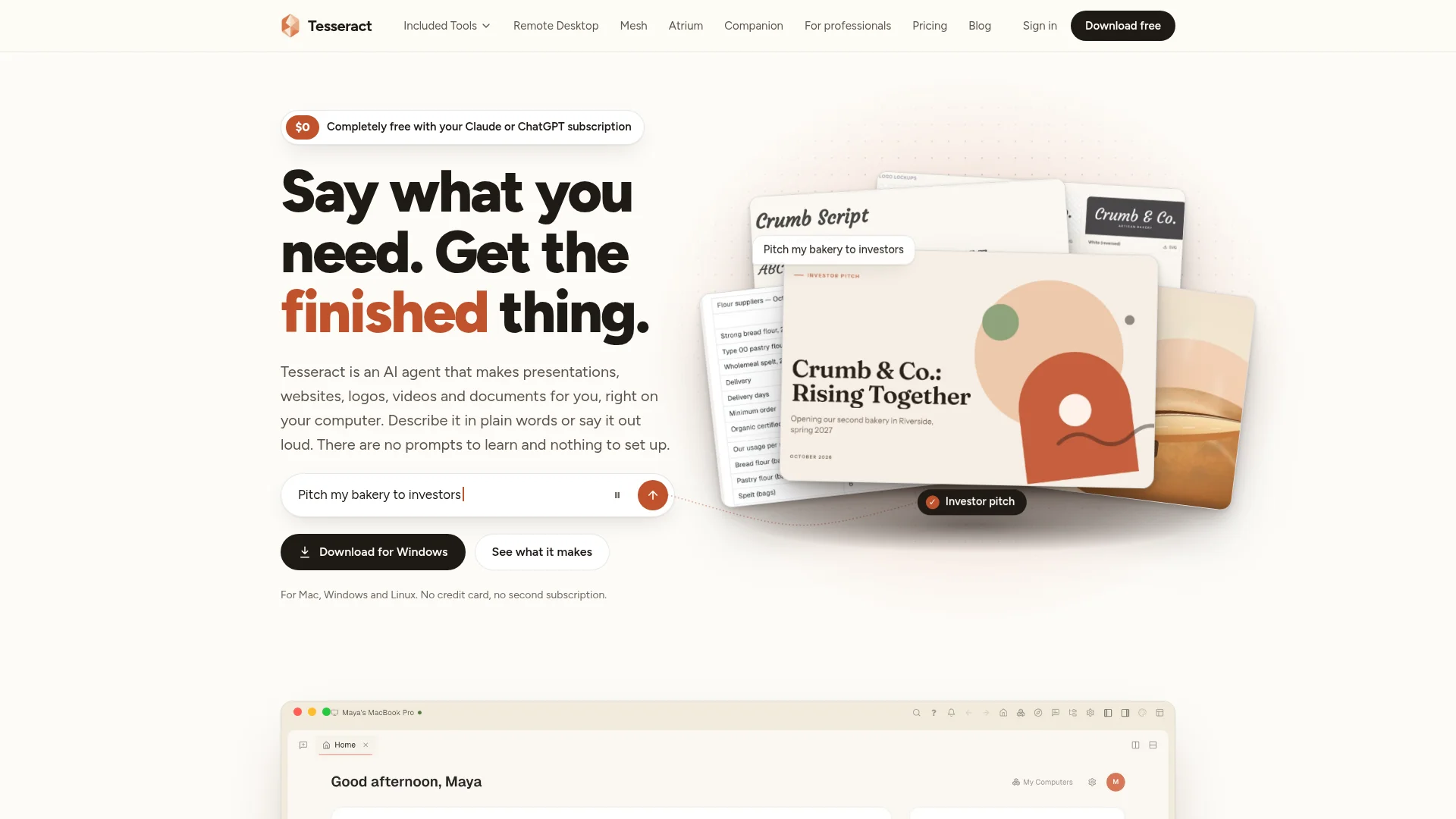
Tesseract is a free desktop AI agent for Mac, Windows, and Linux. Tell it what you need by typing or speaking, and it can create presentations, websites, videos, logos, documents, and more.

Free Option

About Tesseract

Who It's For

Tesseract is for people who want finished digital work without learning complex software or writing special prompts. It can help small businesses, teams, and individuals create files, research information, manage tasks, and work across their computers.

What You Get

You can make presentations, PDFs, websites, videos, images, logos, documents, and brand materials. You receive real files that you can open and edit. The app also includes search, research, remote desktop, file sharing, voice help, and other tools.

How It Works

Describe what you want by typing or speaking. Tesseract shows a plan, opens the tools it needs, and displays its progress. It asks before important actions, then gives you editable files. It works with Claude, ChatGPT, Gemini, or a free allowance, with no Tesseract subscription.
Stay in the loop

Weekly roundup of new AI agents. No spam, unsubscribe anytime.

Subscribe and get the free 2026 AI Agents Field Guide

Join 1,500+ AI builders Β· weekly, no spam

Features & Capabilities

🎨 Creative Production

Presentation and Document Creation

Generates editable presentations and documents that can be exported as PowerPoint or PDF.

Website Builder

Creates multi-page websites with live previews and files ready for publishing.

Brand and Image Design

Produces logos, image assets, fonts, color palettes, and complete brand kits.

Video Creation

Creates videos from plain-language descriptions without requiring specialized tools.

πŸ€– Agentic Automation

Natural-Language Task Execution

Turns typed or spoken requests into completed multi-step tasks without requiring prompt expertise.

Plan-First Workflows

Shows an execution plan before acting and requests approval before important actions.

Cross-Application Control

Uses the mouse and keyboard in other desktop applications, identifying controls and pausing at login steps.

Overnight Task Execution

Continues approved work after the user leaves and provides a report of actions and decisions.

πŸ’» Multi-Computer Productivity

Remote Desktop

Connects to and controls another computer remotely to continue work from anywhere.

Device Network

Links personal computers through a private network for coordinated access and task execution.

Cross-Device File Transfer

Copies content between devices and sends files across connected computers.

Background Computer Work

Starts a job on one computer and lets another machine finish it while the original window is closed.

πŸ”Œ AI Model Access

Multi-Provider AI Support

Works with Claude, ChatGPT, Gemini API, and supported coding agents.

Per-Conversation Model Selection

Lets users choose and switch the AI provider used for each conversation.

Automatic Account Switching

Moves to another connected account when an AI account reaches its usage limit.

Bring-Your-Own-AI Pricing

Uses existing AI subscriptions without metering Tesseract usage or requiring a separate subscription.

πŸ”Ž Research and Information Tools

Multi-Engine Search

Searches across 131 engines to find information from the web.

Deep Research

Performs extended research and synthesizes findings into useful outputs.

Web Task Execution

Works directly on the web to complete research and operational tasks.

Stock Photo Discovery

Finds stock photography for use in creative projects.

🧰 Guided Makers

Guided Project Templates

Provides guided workflows for websites, presentations, writing, images, video, branding, apps, games, and more.

Data Analysis

Offers a dedicated maker for analyzing datasets and producing insights.

Custom Projects

Supports user-defined projects beyond the predefined guided makers.

Personal Assistant Maker

Configures an assistant with a name, personality, and specific jobs to perform.

πŸ—£οΈ Voice and Assistance

Voice Input

Accepts spoken requests through a microphone so users can describe tasks conversationally.

In-App Voice Guide

Provides a spoken assistant that answers questions and navigates users to relevant app features.

Global Shortcut Access

Opens Tesseract over any application with a keyboard shortcut and attaches a screenshot for context.

Desktop and Web Access

Makes the product available through desktop applications and a browser interface.

πŸ‘₯ Collaboration and Personal Assistant

AI Teammate

Provides an AI collaborator for completing work alongside the user.

Team Chat

Includes Atrium chat for communicating and working with others.

Email and Calendar Briefings

Allows a personal assistant to read mail and calendars and deliver a daily summary.

Multi-Channel Assistant Access

Plans assistant access through Atrium, WhatsApp, Telegram, Slack, email, and phone calls.

πŸ”— Productivity Integrations

Office File Support

Works with common office files and makes generated outputs editable.

Business App Connections

Supports services including Gmail, Google Calendar, Microsoft 365, Teams, and Notion.

Archives and File Handling

Provides tools for working with archives and managing generated files.

Extensible Service Support

Offers compatibility with more than 50 additional services for assistant workflows.

πŸ” Security and Control

Password Manager

Stores passwords locally with device-based encryption protected by a master password.

Approval Controls

Requires user confirmation before sending messages or taking significant actions.

Undo File Changes

Allows file modifications made by the agent to be reversed.

Local File Storage

Keeps user files on their computers while making sign-in optional.

πŸ“€ Editable Outputs

Multiple Export Formats

Exports work as PowerPoint, PDF, animated web pages, images, videos, and publishable website files.

Editor-Based Editing

Opens generated work in editors so users can manually revise it.

Font Installation

Installs fonts used in generated creative projects directly on the computer.

Live Website Preview

Shows website changes in a live preview before publishing.

πŸ–₯️ Platform Availability

Cross-Platform Desktop App

Runs on Mac, Windows, and Linux with automatic installation and updates.

Standalone Companion Apps

Includes Remote Desktop, Mesh, and Atrium as separate free applications.

Browser Version

Provides access through a browser-based version of Tesseract.

Optional AI Subscription

Offers a free allowance for users without Claude or ChatGPT, with optional pay-as-you-go top-ups.

Screenshots

See Tesseract in action

Use Cases

Creating Investor-Ready Business Presentations

Small-business owners and other nontechnical operators often need polished fundraising or stakeholder presentations without the time, design skills, or presentation software expertise to build them. Tesseract turns a plain-language request into an editable PowerPoint, PDF, or animated web presentation, first confirming the audience and scope and then producing finished files.

Small BusinessFor: Small-Business Owner

Launching a Business Website Without Technical Skills

Entrepreneurs need a professional website with services, menus, hours, or ordering functionality but may not have a developer or agency budget. Tesseract creates multi-page websites from a simple description, provides a live preview, and delivers files ready to publish and edit.

Small Business and Local ServicesFor: Small-Business Owner

Building a Complete Brand Identity

New and growing businesses often need a cohesive logo and visual identity but lack dedicated brand or design resources. Tesseract generates logo options and expands the selected direction into a brand kit with logo variations, palettes, fonts, and matching colors that can be edited and used across business materials.

Branding and MarketingFor: Founder or Small-Business Marketing Lead

Automating Cross-Application Business Work

Operators lose time completing repetitive tasks across spreadsheets, forms, email, and other desktop applications, especially when working remotely or across multiple computers. Tesseract can view the current screen, operate apps with the mouse and keyboard, draft replies, check numbers, finish forms, transfer files, and connect to remote computers while pausing for approval at important steps.

Small Business OperationsFor: Operations Manager or Business Owner

Delegating Large Creative and Research Projects

Individuals and small teams may need to produce videos, documents, social posts, research, data analyses, or seasonal marketing materials without assembling multiple specialized tools. Tesseract plans the work before acting, uses the necessary tools and AI models, can continue working after the user closes the window or overnight, and provides finished editable files plus a report of its decisions.

Marketing and Professional ServicesFor: Solo Entrepreneur or Small Team

Creating a Personalized Administrative Assistant

Busy professionals need help monitoring email and calendars, preparing daily briefs, and coordinating routine communication but may not have an executive assistant. Tesseract’s guided personal-assistant maker creates an assistant with a defined identity and responsibilities, connects it to services such as Gmail, Calendar, Microsoft 365, Teams, and Notion, and requires approval before sending messages or taking actions.

Professional ServicesFor: Founder, Executive, or Administrative Lead

Specifications

Deployment
Browser
API
Browser
Cloud
Target Audience
Individual
Startup
Business
Complexity
Developer

Pricing

Bring your own AI

Per one-time

Free
  • Sign in with the subscription you have
  • Tesseract never meters your use
  • Everything it makes, every tool
  • Pick a different AI per conversation

Free allowance

Per one-time

Free
  • AI included, through Tesseract
  • A bigger allowance when you sign in
  • Building something big? Ask for more

Top up

Per one-time

$10
  • Unlocks the most capable models
  • A bonus on your first top-up
  • Auto top-up refills your balance when it runs low
  • Vouchers and promo codes

βœ“ Free plan β€’ βœ“ Plans from $10 / one-time

View current pricing

Integrations

Claude
ChatGPT
Gemini
Claude Code
OpenAI Codex
Gemini CLI

Want your AI tool listed here?

Start with a free eligibility check.

Submit