Course
Give your AI a permanent memory of your business. A course for people who use ChatGPT or Claude daily.Compound Context
What it is
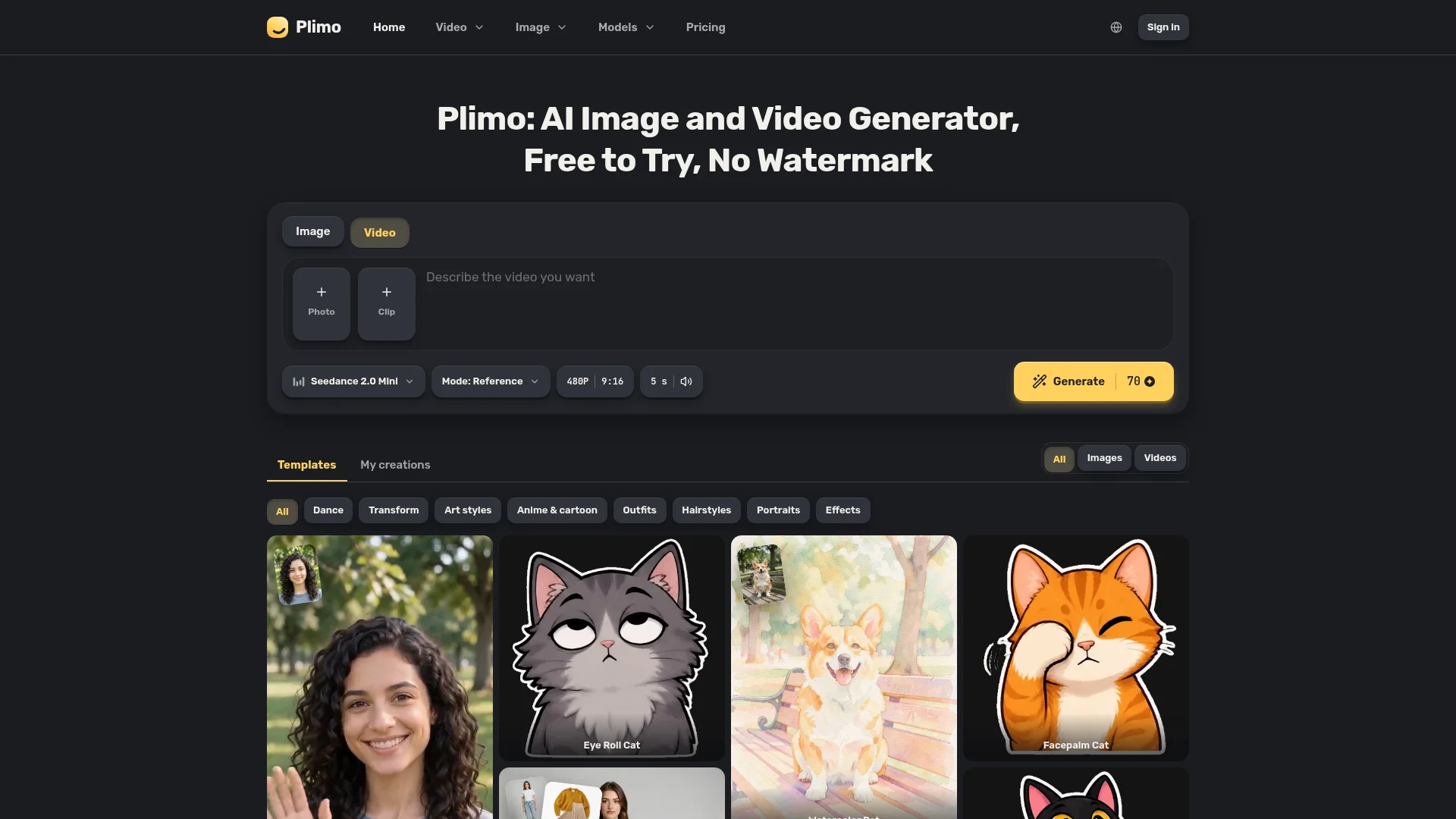
Plimo lets you create images, GIFs, and videos from words or photos. Choose from many AI models, use ready-made templates, compare results, and download without watermarks.
Price:
Free plan · Free trial · From $7.50/month
Who it's for:
Individuals and businesses
FeaturedFree Option

About Plimo

Who It's For

Plimo is for anyone who wants to make pictures or short videos without learning complex software. You can use it for social posts, product photos, headshots, invitations, memes, art, or trying new hairstyles and clothes.

What You Get

You get image and video tools in one account, with shared credits and ready-made templates. Plimo offers 16 image models and 17 video models, including options for readable text, mixed photos, sound, 4K output, and clips up to 30 seconds. New accounts receive 100 free credits.

How It Works

Choose a tool, then upload a photo or describe what you want. Pick a model, or use a template with the settings already prepared. Generate, make changes if needed, and download the result without a watermark. You can also turn an image into the first frame of a video.
Stay in the loop

Weekly roundup of new AI agents. No spam, unsubscribe anytime.

Subscribe and get the free 2026 AI Agents Field Guide

Join 1,500+ AI builders · weekly, no spam

Features & Capabilities

🎨 AI Image Creation

AI Image Generation

Creates original images from text prompts and optional reference photos.

Image-to-Image Transformation

Reimagines an existing photo with new styles, settings, characters, or visual treatments.

AI Photo Editing

Changes photo backgrounds, ages, and styles using natural-language instructions.

Specialized Image Generators

Supports art, anime, GIF, headshot, clothing, and hairstyle generation workflows.

🎬 AI Video Creation

AI Video Generation

Produces videos from prompts, images, or combinations of both.

Image-to-Video

Animates still images with movement, camera effects, and often synchronized sound.

Text-to-Video

Turns written scene descriptions into short video clips without requiring a source image.

Motion Transfer

Makes a person in a photo replicate movements from an uploaded reference video.

🧩 Models and Creative Control

Multi-Model Access

Provides access to 16 image models and 17 video models from multiple AI providers through one account.

Template Library

Offers trend-focused templates with prepared prompts and settings for quick generation.

Model Comparison

Lets users run the same idea across different models and compare the outputs.

Model Selection by Use Case

Supports choosing models optimized for readable text, photo blending, cinematic video, sound, resolution, or duration.

⚙️ Creation Workflow

Guided Generation Flow

Guides users from selecting a tool through adding a prompt or photo, choosing a model, and generating content.

Reference Photo Uploads

Accepts selfies, product images, family photos, and other visual inputs as generation references.

Iterative Regeneration

Allows users to retain preferred results or revise details and generate again.

Cross-Format Creation

Lets users use a generated image as the first frame for an image-to-video project.

📐 Output and Delivery

High-Resolution Output

Generates images and videos at resolutions up to 4K on supported models.

Extended Video Clips

Supports videos up to 30 seconds on selected video models.

Sound-Enabled Video

Produces audio with many video generations, including supported cinematic and social formats.

Watermark-Free Downloads

Provides downloadable images and videos without embedded watermarks.

👤 Account and Access

Unified Account and Credits

Combines image and video tools, models, and usage credits under one login.

Cross-Device Access

Lets signed-in users access their creations across devices.

Free Starter Credits

Gives new accounts 100 non-expiring credits for initial image and video generation.

Fast Model Availability

Adds newly released image and video models to the platform without requiring separate accounts.

🔒 Privacy and Usage

Upload Privacy

States that user uploads and generated results are not used to train Plimo's models.

Personal and Commercial Usage

Allows commercial use with a membership while restricting free-account results to personal use.

Result Retention

Retains results for seven days on free accounts and longer for members.

Screenshots

See Plimo in action

Use Cases

Creating Product Marketing Assets for Small Shops

Small-shop owners often need polished product imagery and promotional materials without hiring photographers or designers. Plimo transforms simple product photos into studio-style listing images, posters, signs, and other campaign assets, with model selection for readable text and high-resolution output.

E-commerce and RetailFor: Small Business Owner

Producing Short-Form Social Media Videos

Social media marketers and creators need a steady stream of engaging vertical content without complex video software or production resources. Plimo generates clips from text or still images, adds movement and sound, and provides templates and models suited to TikTok, Reels, and Shorts.

Digital Marketing and Social MediaFor: Social Media Manager

Turning Existing Photos into Animated Video Content

People and organizations with meaningful or valuable still images may want to make them more engaging or memorable. Plimo’s Image to Video tool animates product shots, family photos, and other images with described movement, camera effects, and often sound, while allowing users to carry an image directly into video creation.

Content Creation and Personal MediaFor: Content Creator

Generating Professional Headshots and Profile Images

Job seekers, professionals, and online creators may need polished profile imagery but lack access to a studio or photographer. Plimo converts a single selfie into a professional headshot or refreshed profile picture, enabling fast experimentation with different visual styles.

Professional Services and Career DevelopmentFor: Professionals and Job Seekers

Visualizing Personal Style and Creative Concepts

Consumers often want to preview a hairstyle, hair color, outfit, anime identity, or artistic concept before committing to it. Plimo applies these transformations to uploaded photos or prompts, helping users make appearance decisions and create personalized, shareable artwork with minimal creative expertise.

Consumer Lifestyle and Creative EntertainmentFor: Consumers and Hobbyist Creators

Specifications

Deployment
Browser
Cloud
Target Audience
Individual
Business
Complexity
No-code

Pricing

Free

Per one-time

Free
  • 100 credits once
  • Trial models
  • 1K image and 480p video resolution
  • No commercial use
  • Creations kept 7 days

Plus

Per monthly

$7.5
  • 3,000 credits per month
  • Images up to 1,500
  • Videos up to 50
  • Images at once: 4
  • Videos at once: 2
  • Creations kept 30 days
  • All models and resolutions
  • Commercial use
  • Priority queue
  • Priority support
  • Credit packs available

Pro

Per monthly

$14.5
  • 8,000 credits per month
  • Images up to 4,000
  • Videos up to 133
  • Images at once: 8
  • Videos at once: 4
  • Creations kept 90 days
  • All models and resolutions
  • Commercial use
  • Priority queue
  • Priority support
  • Credit packs available

Ultra

Per monthly

$64.5
  • 50,000 credits per month
  • Images up to 25,000
  • Videos up to 833
  • Images at once: 32
  • Videos at once: 16
  • Creations kept 360 days
  • All models and resolutions
  • Commercial use
  • Priority queue
  • Priority support
  • Credit packs available

Yearly billing is also available at the displayed annual totals of $90 for Plus, $174 for Pro, and $774 for Ultra; credit packs are mentioned but no prices are published.

View current pricing

Integrations

OpenAI
Google
ByteDance
Kuaishou
Alibaba
xAI

Want your AI tool listed here?

Start with a free eligibility check.

Submit