Course
Give your AI a permanent memory of your business. A course for people who use ChatGPT or Claude daily.Compound Context
Commabot logo

Commabot

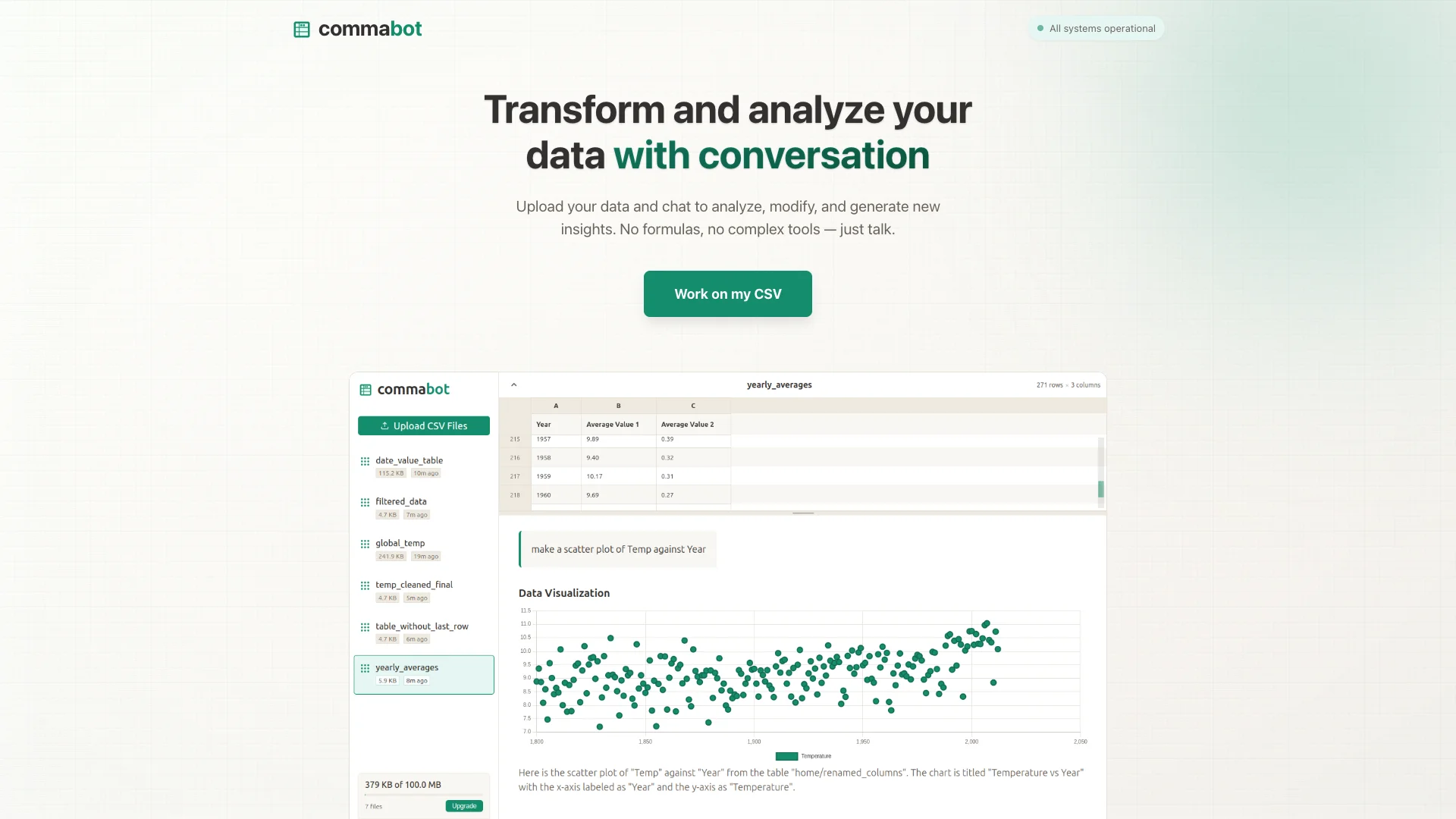
Commabot is an AI tool that lets you talk to your data like a person. You can upload any CSV file and ask questions, generate summaries, or clean it up using simple chat commands, without needing complex formulas or coding. This makes understanding and changing your data super easy for everyone.

About Commabot

Who It's For

Commabot is for anyone who works with data in CSV files but struggles with complex spreadsheets. This includes business users, students, and researchers. If you need to analyze sales, surveys, or financial records easily without technical skills, this tool makes data simple.

What You Get

You can chat with your data directly. Ask questions, generate charts, and get summaries using simple English commands. The tool also helps you clean, transform, and edit your data easily. Plus, you can convert CSV files to other formats like JSON.

How It Works

Upload your CSV file to Commabot. Then, simply type commands like "Show totals" or "Remove empty rows." The AI assistant understands your plain language and performs the tasks. Once done, you can save and download your updated data file.
Stay in the loop

Weekly roundup of new AI agents. No spam, unsubscribe anytime.

Subscribe and get the free 2026 AI Agents Field Guide

Join 1,500+ AI builders · weekly, no spam

Features & Capabilities

💬 Conversational AI Interface

Natural Language Querying

Analyze and query data using plain English, eliminating the need for complex formulas or tools.

AI-Driven Data Interaction

Engage in a chat-based dialogue to explore, modify, and generate new insights from uploaded datasets.

⚙️ Data Processing & Transformation

Intelligent Data Cleaning

Quickly clean and prepare raw data for analysis through intuitive conversational commands.

Effortless Data Transformation

Modify and reshape your data easily without manual spreadsheet operations.

📊 Insight Generation & Reporting

Automated Charting

Generate various charts and visual representations based on your data queries.

Concise Data Summarization

Obtain quick, understandable summaries of your datasets and analytical results.

Use Cases

Automating Business Report Generation and Analysis

Business professionals often spend valuable time wrestling with complex spreadsheets to generate reports, analyze sales figures, or summarize survey results. Commabot enables them to upload CSV data and use natural language commands to quickly create charts, summaries, and perform data manipulation, streamlining the reporting process.

B2B SaaS, Sales, MarketingFor: Business Professionals, Account Executives, Marketing Analysts, Go-to-Market Leaders

Streamlining Data Cleaning and Preparation

Data professionals frequently face the tedious and time-consuming task of cleaning, standardizing, and transforming raw CSV data. Commabot's AI assistant allows users to apply bulk edits, extract specific information from unstructured text, and perform complex transformations using simple conversational commands, dramatically reducing manual effort and improving data quality.

Data Analytics, Market Research, OperationsFor: Data Analysts, Data Practitioners, Researchers, Operations Managers

Simplifying Financial Data Tasks and Tax Preparation

Financial professionals and individuals often grapple with the complexities of managing financial records, preparing tax data, and performing various accounting tasks within spreadsheets. Commabot automates these processes, allowing users to analyze, summarize, and transform financial CSV data through simple conversational commands, making tax preparation and financial reporting more efficient and less error-prone.

Financial Services, Accounting, SMBsFor: Financial Analysts, Accountants, Small Business Owners, Tax Preparers

Accelerating Academic and Research Data Analysis

Academic researchers and students frequently work with survey data or experimental results but may find traditional data analysis tools overly complex. Commabot offers an intuitive, no-code solution, allowing them to upload CSV files and use natural language to analyze data, generate insights, and summarize findings for their studies and publications.

Academia, Research & DevelopmentFor: Researchers, Students, Statisticians

Extracting Market Insights and Forecasting Trends

Businesses strive to understand market dynamics and predict future trends from their sales, marketing, and survey datasets, a process often hindered by complex analytical requirements. Commabot empowers users to upload relevant CSV data and use simple chat commands to analyze patterns, forecast trends, and extract actionable market insights, enabling data-driven decision-making.

Market Research, Sales, Marketing, RetailFor: Market Analysts, Business Intelligence Specialists, Sales Leaders

Frequently asked questions

Commabot is an AI-powered online CSV editor that combines a familiar spreadsheet interface with an intelligent virtual assistant to simplify working with CSV files. It enables users to view, edit, analyze, and convert CSV data interactively through natural language chat commands without the need for formulas or programming skills.

Commabot is suitable for data analysts, business professionals, researchers, students, and developers who need to manipulate, analyze, or automate repetitive tasks on CSV datasets.

The main features of Commabot include clean, organized spreadsheet-style CSV viewing and editing; an AI assistant that supports natural language commands to automate tasks, analyze data, and generate insights; data extraction from unstructured text within CSVs; bulk data editing automation for consistency and speed; conversion between CSV and other formats like nested JSON and XML; a dark mode interface for reduced eye strain; and customizable workspace and seamless integration capabilities.

To use Commabot, you first create an account and log in to the platform. Then, upload your CSV file to the workspace. You can use the AI assistant by typing questions or commands about your data, such as "Show me the totals" or "Filter rows where sales > 100". After that, edit or convert the CSV file as needed, and finally, save and download the updated file to your device.

Details about pricing specifics are limited; some sources mention a free trial and that it is free or not yet fully launched commercially. It is recommended to check the official site for the latest pricing information.

Commabot is a web-based tool accessible via browsers, making it cross-platform and usable on any device with internet access.

The AI assistant interprets natural language commands to perform data analysis, editing, bulk operations, and data conversion. It learns from user patterns to improve suggestions and automations continuously, providing a no-code experience for managing complex CSV datasets.

Yes, Commabot supports conversion between CSV, nested JSON, and XML formats, facilitating integration with other tools or workflows.

Specific security policies are not detailed in the search results. Users should refer to Commabot’s official privacy policy or contact support for precise information on data protection and privacy.

The results do not explicitly state collaboration features. For team or multi-user access, checking the official platform or support channels is recommended.

No direct support contact information was found in the search results. Visit the official Commabot website or platform for contact details and help resources.

Common use cases for Commabot include business report data manipulation and visualization, academic and research data analysis, streamlining data entry and cleaning processes, automating financial data tasks and tax data preparation, and efficiently forecasting trends and extracting market insights.

Tags